
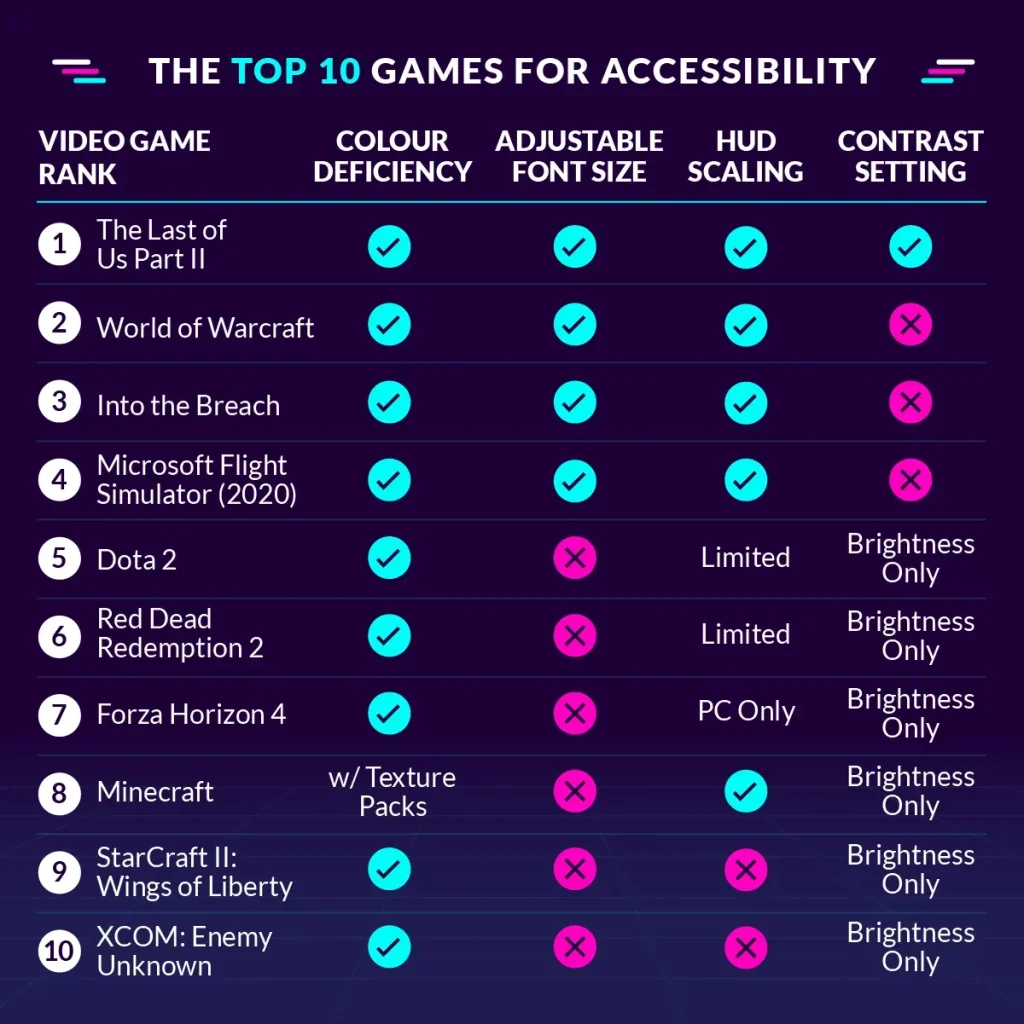
Accessibility in Games is more than a feature list; it is a design philosophy that broadens who can play. When developers adopt inclusive game design, they enable players with diverse abilities to enjoy the full richness of play, story, and competition. By prioritizing accessible UX, barrier-free gaming experiences, and clear feedback, studios can reach new audiences while maintaining engagement. Following game accessibility guidelines helps teams implement practical features such as adjustable text, alternative input methods, and assistive technology in games. This article outlines why accessibility matters, how to start from concept to launch, and how ongoing testing fuels inclusive, high-quality gameplay.
From a broader perspective, universal design for games aims to create inclusive experiences that all players can enjoy, regardless of their abilities. This reframing uses terms like inclusive design, barrier-free play, and equitable gameplay to describe what makes games usable for diverse audiences. Consider accessible gameplay as a standard, with adaptive interfaces, readable text, and assistive technologies becoming integrated rather than add-ons. By speaking the language of universal access, perceptible feedback, and flexible input, developers can align with game accessibility guidelines while reaching new communities.
Accessibility in Games: Inclusive Game Design for Barrier-Free Experiences
Accessibility in Games is a design philosophy that expands who can play, how they engage, and how they connect through play. Inclusive game design sits at the core of this philosophy, aiming for barrier-free gaming experiences that welcome players of all ages, cultures, and abilities. By prioritizing accessible UX, developers craft interfaces and feedback systems that remain usable across devices, contexts, and levels of ability, ensuring fun, challenge, and immersion are preserved.
Understanding players and their needs is foundational. Designers should consider a spectrum of assistive technologies and accommodations—screen readers, high-contrast palettes, alternative input devices, subtitles, descriptive audio, and scalable UI. Research with diverse players helps identify which settings matter most, while early design decisions such as legible typography and flexible camera options broaden access from the outset.
Implementing Game Accessibility Guidelines: From Concept to Launch with Assistive Technology in Games
To translate inclusive principles into shipable features, teams should align with game accessibility guidelines from the start. Define clear accessibility goals in the design brief, build modular systems that support input customization, scalable UI, and captions, and provide accessible navigation patterns that work across keyboards, controllers, and assistive devices. Early prototyping with diverse testers accelerates learning and reduces costly rework later, while ensuring that assistive technology in games remains compatible with core gameplay.
Measuring success requires ongoing observation and iteration. Track engagement and completion rates for players with disabilities, gather qualitative feedback on captions and UI readability, and publish accessibility updates and case studies to demonstrate progress. Case studies from industry leaders and indie developers alike show that embracing this approach yields barrier-free gaming experiences that expand the audience, strengthen brand trust, and set a standard for responsible game development.
Frequently Asked Questions
What is Accessibility in Games and how does inclusive game design contribute to accessible UX?
Accessibility in Games is a design philosophy that broadens who can play and how they play. Inclusive game design supports accessible UX by providing multiple ways to perceive information, flexible input, and clear feedback. Practical steps include understanding players’ needs, scalable UI, captions and descriptive audio, support for alternative input devices, and early testing with diverse players. By embedding these practices from the start, studios reach new audiences and boost engagement without sacrificing fun.
Which game accessibility guidelines should teams follow to deliver barrier-free gaming experiences and leverage assistive technology in games?
Following game accessibility guidelines helps create barrier-free gaming experiences and supports assistive technology in games. Key steps: define clear accessibility goals; design flexible input mappings and device compatibility; ensure screen reader support, captions with context, high-contrast UI, and adjustable text; support assistive technologies and saveable accessibility profiles; test with diverse players and publish results. This approach expands the player base, improves engagement, and demonstrates industry leadership.
| Key Point | Summary | Notes / Examples |
|---|---|---|
| Accessibility as Design Philosophy | Accessibility in Games is a design philosophy that broadens who can play, how they play, and how they connect with others through play. It is not merely a feature list but a core objective guiding development. | Not optional; essential for inclusive experiences. |
| Inclusive Objectives & Audience | Design to reach new audiences, increase engagement, and foster communities built on inclusion. | Supports business and creative goals by expanding reach. |
| Flexible, Adaptive Experience | Provide choices and an adaptive experience rather than a single, rigid path; support assistive tech and varied content formats. | Tailor experiences to individual needs and contexts. |
| Multiple Ways to Perceive Information | Offer visual, audio, and textual alternatives (captions, subtitles, high-contrast UI) to access content. | Helps players with sensory differences access content. |
| Flexible Input & Control Schemes | Remap actions, customize input mappings, support diverse devices, and adjust sensitivity. | Supports motor differences and varied interaction styles. |
| Pacing & Cognitive Load | Manage information density with progressive disclosure, optional tutorials, and consistent UI patterns. | Helps players learn at their own pace without feeling overwhelmed. |
| Equity in Progression | Accessibility features should not create paywalls or grind barriers; maintain fair footing to enjoy core experience. | Promotes inclusive competition and enjoyment. |
| Inclusive UX/UI Design | Typography, color, layout, and feedback must stay legible across contexts; practical strategies include scalable text, high contrast, consistent patterns, subtitles, and parity across input methods. | Improves clarity and usability for all players. |
| Audio, Visual, and Orientation Accessibility | Descriptive audio, visual indicators, multi-language captions, and motion-reduction options support diverse vision and hearing needs. | Ensures players can perceive status and progression even without relying on a single sense. |
| Content, Localization, and Cultural Accessibility | Inclusive storytelling, accurate captions, localization, and readable in-game text. | Supports diverse audiences and cross-cultural understanding. |
| Practical Steps to Implement from Start | Define accessibility goals, prototype early, design modular systems, involve diverse testers, iterate, and document decisions. | Sets a foundation for ongoing inclusion and measurable progress. |
| Measuring Success & Ongoing Improvement | Track engagement, completion for players with disabilities, satisfaction with accessibility features; use surveys and publish updates. | Drives continuous improvement and accountability. |
Summary
HTML table above summarizes the key points from the base content about Accessibility in Games. The table highlights the design philosophy, inclusive objectives, flexible interactions, perceptual options, input flexibility, cognitive load management, fair progression, UX/UI practices, sensory accessibility, content/localization, practical implementation steps, and measurement for ongoing improvement.